In this issue:
- How to split scroll captures into multi-page PDFs.
- Consider a site license for everyone where you work.
- Look up unlock keys, get downloads and review purchases online.
To read this newsletter in your browser, click here:
https://pixelmetrics.com/News/2021-06/
How to split scroll captures into multi-page PDFs.
Savy customer Peter B asked, "How can I split a long scroll capture into a multi-page PDF?"
It's easy, here's how:
1 Select a recent scroll capture by clicking Pics on the capture bar.
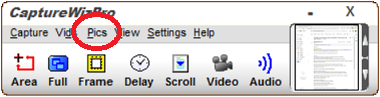
Which opens the PixelMetrics Viewer...
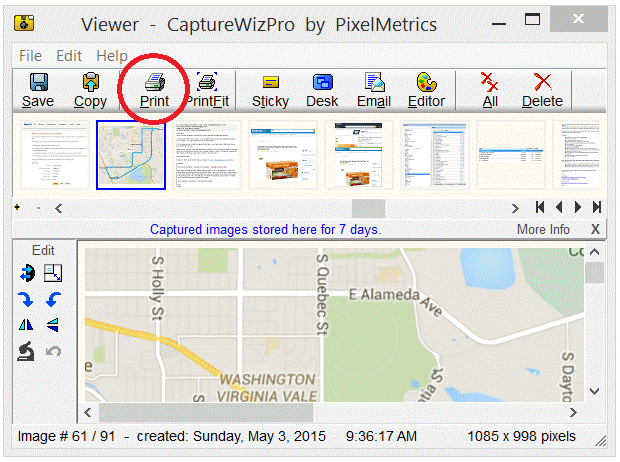
2 On the PixelMetrics Viewer, select any long capture and click Print.
Which opens the Print window...

3 On the Print window, select Microsoft Print to PDF, then click Print.
Which opens the Multi page print window...
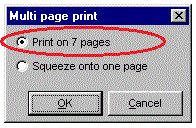
4 On the Multi page print window, select Print on separate pages, then click OK.
Which generates the multi-page PDF you wanted!
Consider a site license for everyone where you work.
Images improve office productivity by clarifying and simplifying communications.
Make it easy for everyone in your office to communicate visually with a CaptureWiz site license!
Here's all about our quantity discounts:
https://pixelmetrics.com/quantity-discounts/index.php
Look up unlock keys, get downloads and review purchases online.
Here's our wonderful online look up system, if you need it...
https://pixelmetrics.com/CustomerLookups
Contact Info:
PixelMetrics: https://www.PixelMetrics.com
Please send comments, suggestions and ideas to: dave@PixelMetrics.com