In this issue:
- Maximizing CaptureWiz utility during a pandemic.
- Consider a site license for everyone where you work.
- Lookup unlock keys, get downloads and review purchases online.
To read this newsletter in your browser, click here:
https://pixelmetrics.com/News/2020-04/
Maximizing CaptureWiz utility during a pandemic.
Here are some great ways CaptureWiz can ease the transition to working at a distance.
1) Include screenshots when communicating via email.
When savvy customer James C. asks questions via email, he copies and pastes screenshots to explain exactly what he's talking about. And by using pictures, he doesn't need to know the exact industry lingo like cam lock, derailleur or taskbar notification area, the screenshot says it all.
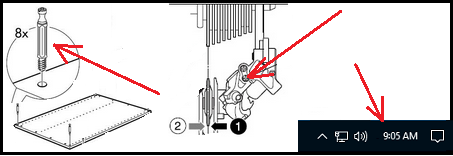
To annotate screenshots, click Editor on the output toolbar...

James says the images really improve the answers to his questions.
2) When a screenshot isn't enough, use a short recording, optionally including your voice.
Sometimes the best and easiest way to explain an issue or idea is to record yourself using the computer while talking out loud.
How to record video:
https://pixelmetrics.com/screen-capture/how-to/video.htm
3) Use CaptureWiz to add images and recordings to online instructions, teaching or training.
Pictures and recordings are a great way to clarify and enliven complex ideas, like this one showing how you can move the capture bar:

CaptureWiz User Manual:
https://pixelmetrics.com/screen-capture/how-to/
Please let me know if you have more ideas for using CaptureWiz in a pandemic!
Consider a site license for everyone where you work.
Images improve office productivity by clarifying and simplifying communications.
Make it easy for everyone in your office to communicate visually with a CaptureWiz site license!
Here's all about our quantity discounts:
https://pixelmetrics.com/quantity-discounts/index.php
Lookup unlock keys, get downloads and review purchases online.
Here's our wonderful online lookup system, if you need it...
https://pixelmetrics.com/CustomerLookups
Contact Info:
PixelMetrics: https://www.PixelMetrics.com
Please send comments, suggestions and ideas to: dave@PixelMetrics.com