|
Surprisingly, many Dell and other computers lack a stereo mix channel.
To get around this problem, we use an audio patch cable or install a standard audio card.
Radio Shack sells the perfect cable, part number 42-2496 ($5.99).
A conventional patch cable would disconnect the computer's main speakers.
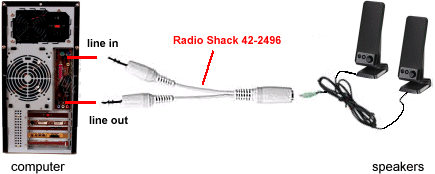
Insert one male 1/8" stereo plug into the computer's blue, Line-In jack, at the back.
Insert one male 1/8" stereo plug into the computer's green, Line-Out jack.
Plug your computer speakers into the cable's female 1/8" stereo jack.
In CaptureWiz, click Options / Video / Settings, and in the Recording Control window, select the Line In channel.
Please complain to the computer manufacturer about selling high-end "media center" computers without this capability built in!
Alternatives
1 Install a full-function sound card.
2 Place a microphone in front of the speakers.
|


