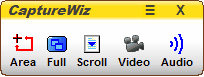
1 Use the Capture bar – the easy way
2 Use Hot keys – captures content that closes or changes when you click the capture bar, such as menus

3 Use a Taskbar icon - pin CaptureWiz to the taskbar for easy access

4 Use the Taskbar Corner icon – the minimalistic way

To permanently turn off the capture bar:
1 On the capture bar, click Menu (≡) / Settings / Options.
2 In the Options window, click the Capture Bar tab.
3 Click the No Capture Bar radio button.