To view all your captures, click your last capture on the left of the capture bar..
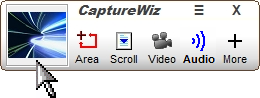
Left-click to open the Fastback Viewer.
Right-click to open the Output Bar, then choose an output for your last capture.
To view captures in File Explorer, on the Capture Bar, click More / Files.
Default folders:
Save: |
C:\Users\User Name\Pictures\CaptureWiz |
SaveAs: |
C:\Users\User Name\Documents\CaptureWiz |